Project detail
Per-project workspace at /projects/detail?id=<project-id>. This is where most of Foil's power lives: kick off scans, browse the code map, inspect findings, generate a PDF report, and review the Phase 6 investigation history — all scoped to one project.
This is the only page that can trigger a deep scan or export a PDF report
The Deep toggle (Phase 6 agentic investigation) and the PDF Report button live only here. The Projects list, the Dashboard, and the Findings page can all kick off a normal scan, but deep scans and PDF exports are per-project operations and must be launched from this page. Both require the Developer edition.
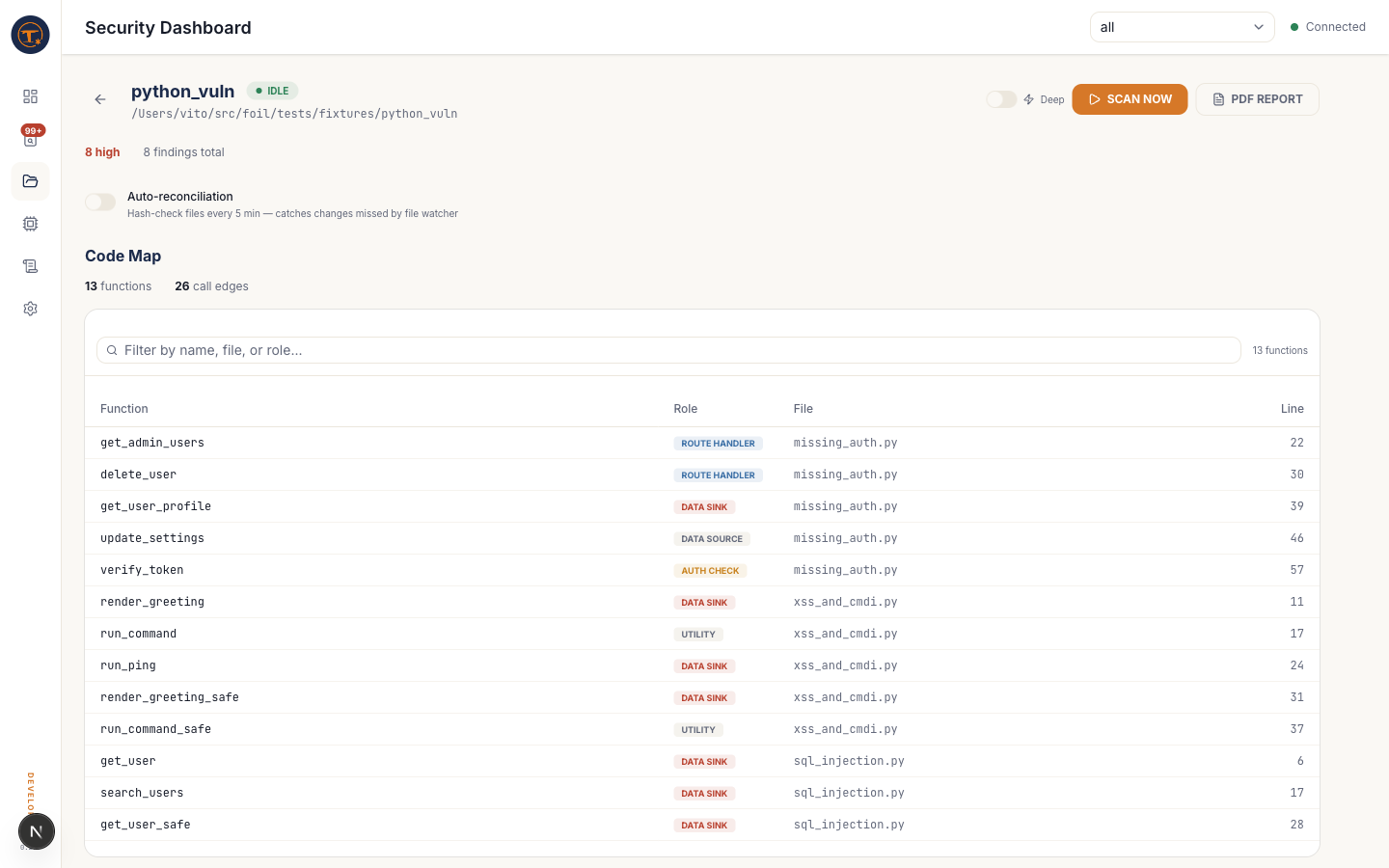
Header
- Back arrow — returns to the Projects list
- Project id — the slug Foil assigned (e.g.
python_vuln) - Status pill —
idle,scanning,queued,error - Path — the absolute file-system root of the project
- Deep toggle (⚡) — enables Phase 6 agentic investigation for the next scan. Adds 30–90s per HIGH logic-class finding (IDOR, broken auth, broken access). This is the only UI control that can enable
--deep— it's not exposed on the Projects list or the Dashboard scan box. Developer edition only. - Scan Now — kicks off a scan with the current Deep setting; equivalent to
foil scan <root> [--deep]. With Deep off this is the same scan you'd launch from the Projects list. - PDF Report — generates a signed PDF security review for the current findings set and streams the file back via WebSocket when ready. The PDF export is only reachable from this page — there is no corresponding button on other routes. Developer edition only; Community sees a
PROupgrade prompt
Stats row
Severity counts pulled from the knowledge graph: high / medium / low / total. The dashboard, projects page, and detail view all read the same underlying counts — expect them to match.
Auto-reconciliation
A per-project toggle. When on, Foil re-hashes every file in the project every 5 minutes and re-scans any file whose hash changed. This catches edits that the file watcher missed — common on network drives, iCloud-synced folders, or after a git checkout of a large range.
Default is off: the file watcher is enough for most day-to-day development.
Code Map
The deterministic, tree-sitter-derived view of what Foil "sees" before the LLM is even called.
- Summary line — function count + call-edge count
- Function table — searchable (by name, file, or role), paginated. Columns:
Function— the function nameRole— color-coded badge:-
ROUTE HANDLER— entry points reachable from HTTP -
AUTH CHECK— middleware / decorators that gate access -
DATA SINK— functions that write to DB, shell, eval, redirect, etc. -
DATA SOURCE— functions that read attacker-controllable input -
UTILITY— internal helpers with no security-relevant role
-
File— relative pathLine— declaration line
- Call edges panel — adjacency list of caller → callee pairs. Useful for spotting unreviewed paths into data sinks.
If the Code Map is empty, run a scan first — the map is built during Phase 1 of foil scan.
Findings (recent)
Top 15 findings for this project rendered as expandable rows — same component as the main Findings page. Click View all → to jump to /findings?project=<id> for the filtered full list.
Investigations (Phase 6)
Shown only when the project has had at least one --deep scan. Each row:
- Verdict icon + label —
CONFIRMED(red shield),DISMISSED(green shield),UNCERTAIN(?) - Category — IDOR, Broken Access Control, etc.
- Function — file:line
- Confidence % — the agent's self-reported confidence in the verdict
- Deep dive link — opens
/findings/deep-divewith the investigation's full trace
Counts at the top of the section sum by verdict. Use this to answer "how many HIGH findings survived Phase 6?" at a glance — the CONFIRMED count is your real HIGH backlog.
What you can do from this page
- Kick a quick re-scan without navigating away
- Toggle Deep for a targeted audit pass
- Generate a PDF report for a stakeholder (Developer)
- Turn on auto-reconciliation for drift-prone projects
- Explore the code map to understand coverage before trusting findings
- Triage investigations in priority order (CONFIRMED first)